 DeleGate as a yet another remote shell
July 1, 2014 -- fixed
OUTLINE
- simple, light, easy and portable remote shell
- not compatible with any other remote/network shell as rsh, ssh, ...
- based on the YYSH (remote shell protocol) and YYMUX (multiplexing/tunneling protocol)
- useful in mobile environment to retain remote terminal connections virtually persistent
- Features:
- encryption by SSL or Credhy
- compression by Zlib
- logging display (tty) output
- relaying X Window
- relaying VNC
- relaying by built-in proxies: DNS, FTP, HTTP, POP, SMTP, and SOCKS
- port forwarding for any TCP or UDP ports
- Japanese character code conversion
- repairing the connection broken in lower layer accidentally
- relaying YYSH over YYMUX and YYMUX over YYSH are both possible
- YYSH can be relayed by other generic proxies as SOCKS or HTTP (SSLtunnel)
- available both on Unix and Windows + CYGWIN
- available in DeleGate/9.9.7 and after
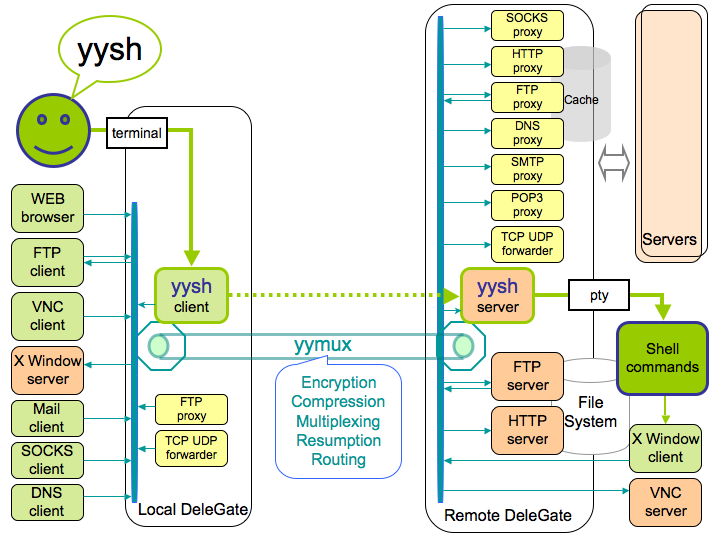
- What to do
-
At the remote-host> delegated -P6023 SERVER=yysh
At the local-host> delegated -Fyysh remote-host -yf -yx
USAGE
- Example-1
Server side
Serv% delegated SERVER=yysh -P6023 -fvClnt% delegated -Fyysh Serv:6023 -yiAt the server side (on the host named "Serv" in this example), run DeleGate (of which name is delegated) to work as a yysh server (SERVER=yysh) at the port number 6023 (-P6023) in foreground with log output to the console (-fv).At the client side, run DeleGate as a yysh client (-Fyysh) connecting to the yysh server at the port 6023 on the host "Serv" (Serv:6023) with status information (-yi).
- DeleGate as a YYSH client (with -Fyysh option) shows the usage.
% delegated -Fyysh -help
: ////////////////////////////// 2010/03/27 Y.Sato @ @ AIST.Gov.Japan
:  Yet another remote shell on the top of YYMUX   ( - ) {YYSH/0.4,YYMUX/0.13}
:  Usage:                                        _<   >_
:    server
:      Serv% delegated SERVER=yysh -P6023
:    client
:      Clnt% delegated -Fyysh Serv[:Port][/Dir] [Options] [Remote-command]
:  Options:
:    -p Port  the port number of the server other than 6023 (or -pPort)
:    -d Dir   the initial directory on the server (or -dDir)
:    -b Str   send Str to the remote shell on the beginning (or -bStr)
:    -j[uesj] convert Japanese char. code (to display) to utf-8, EUC-JP or so
:    -yi      show YYSH status info. on login, resumption and logout
:    -yj      show the negotiation dialog on the YYSH/YYMUX protocol
:    -yl      logging YYSH display output (to ./yysh-disp-md-HM.log)
:    -yc      apply Credhy encryption to YYSH
:    -ys      apply SSL encryption to YYSH (with the OpenSSL lib.)
:    -yz      apply Zlib compression (deflate) to YYSH
:    -yy      enable YYMUX multiplexing and connection persistency
:    -yx      enable X Window proxy
:    -yf      enable forwarding to remote proxies (-yfd -yff -yfh -yfs -yfv)
:    -yfd[:Map] enable DNS server/proxy at the server side
:    -yff[:Map] enable FTP server/proxy at the server side
:    -yfh[:Map] enable HTTP server/proxy at the server side
:    -yfm[:Map] enable SMTP proxy at the server side
:    -yfp[:Map] enable POP proxy at the server side
:    -yfs[:Map] enable SOCKS proxy at the server side
:    -yfv[:Map] enable VNC proxy
:    -yf:Map    add port forwarding
:    Map        [localPort][/localHost][:[remotePort][/remoteHost]]
:    Port       portNumber[.udp]
:  Remote-command:
:    .lst Remote-dir
:    .get [Local-file] Remote-file
:    .put Local-file [Remote-File]
:    other commands available on the server
:  Optional parameters:
:    AUTHORIZER,MYAUTH,PERMIT,REJECT,SOCKS,STLS,YYMUX,YYCONF,DGROOT
: ///////////////////////////////////////////////////////////////////
- Example-2
With the option -yf, a set of port forwardings as below is enabled. DeleGate as a YYSH server at the remote host works as "proxy" and "origin" servers for each application protocol.
- vnc://127.0.0.1:15900 ---> vnc://remoteHost (relay to 127.0.0.1:5900)
- dns://127.0.0.1:10053.udp ---> dns://remoteHost:53.udp (proxy)
- ftp://127.0.0.1:10021 ---> ftp://remoteHost (proxy and origin)
- pop://127.0.0.1:10110 ---> pop://remoteHost (proxy)
- smtp://127.0.0.1:10025 ---> smtp://remoteHost (proxy)
- http://127.0.0.1:10080 ---> http://remoteHost (proxy and origin)
- socks://127.0.0.1:11080 ---> socks://remoteHost (proxy)
local% yysh 192.168.1.2 -yf -yx -yz -yi
---- yysh host [192.168.1.2] = {:@ 192.168.1.2 :6023./}
----  @ @ connecting to yysh://192.168.1.2:6023 ... [9481]
---- ( - ) 21:37:25 Sun 28/Mar {DeleGate/9.9.7-pre35} 102x59
----_<   >_ connected (0.989)(0.989)
:::: DNS port: 10053.udp
:::: VNC port: 15900
:::: FTP port: 10021
:::: POP port: 10110
:::: SMTP port: 10025
:::: HTTP port: 10080
:::: SOCKS port: 11080
~~~~ DeleGate/9.9.7-pre35; Zlib/1.2.3; OpenSSL/0.9.7l
~~~~ user@remote/Users/user DISPLAY=127.0.0.1:1.0

remote%
----  @"@  lost connection ??? [192.168.1.2:6023] Y3
---- ( o ) {trying to resume...} 21:37:39.19
---- trying ... (0.005)
---- trying ... (3.429)
---- trying ... (7.033)
---- trying ... (10.702)
---- trying ... (14.480)

----  @ @ 21:37:55.19 (16.009 sec.)
----\( v )/ {reconnected!! #0 Y3}

remote% echo $DISPLAY
127.0.0.1:1.0
remote% xterm
remote% logout

----  @"@  ~~~~ 21:38:24.52 (59.261 sec.) [9481] [192.168.1.2:6023] Y3
---- ( ~ )/~~~~ {Bye.} (tty: recv 233, sent 35)
----Zlib1: recv 9919 / 3944.z (39.8%), sent 3940.z / 25431 (15.5%)

local%
(DGbeecon-10-03-01-sato yysh)